


📝 Blog Summary
Getting started with Kamailio SIP can feel overwhelming. This guide simplifies it, from setting up your first SIP server to handling routing and registrations. Perfect for developers new to Kamailio SIP server configuration.
Kamailio is an open-source SIP server built purely for signaling – handling registrations, routing, authentication, and load balancing without touching media streams. It powers Tier 1 carriers, CPaaS platforms, and large-scale VoIP deployments because it can process thousands of SIP transactions per second on modest hardware while giving engineers complete control over every message.
There’s a moment when every VoIP developer hears about Kamailio, when it usually comes with the warning: “Powerful, but not beginner-friendly.”
And that’s true.
The config files are dense, the modules are many, and unlike GUI-based VoIP tools, Kamailio gives you raw power, but expects you to know what you’re doing.
This guide is an attempt to make it all easier for you.
I’ll walk you through everything you need to launch your first SIP server using Kamailio, from how SIP messages flow to basic routing, client registration, and configuration best practices. Whether you’re building a CPaaS platform, managing large-scale VoIP traffic, or just want to learn SIP routing with Kamailio, this is the place to start.
What Is Kamailio SIP Server and Why Use It?
If you’re building a scalable VoIP infrastructure, Kamailio is likely one of the first names you’ll hear. And for good reason. The Kamailio SIP server is an open-source SIP server capable of handling thousands of calls per second. Unlike traditional PBX systems that bundle signaling with media and business logic, Kamailio SIP server focuses purely on SIP signaling, making it ideal for large-scale, distributed deployments.
Whether you’re routing SIP messages, authenticating users, or registering endpoints, Kamailio acts as the SIP traffic cop, processing, redirecting, and securing each request in near real time.
So, why is it trusted by Tier 1 carriers, CPaaS platforms, and telecom operators?
Because it’s:
- Lightweight and high-performance
- Highly customizable using config files and modules
- Built for SIP-only environments and scalable beyond a single server
- Flexible enough for routing, NAT traversal, registration, and security
In short, it gives you total control over SIP traffic, without the bloat of full-stack PBX systems.
Kamailio SIP Server Architecture
Here’s how SIP traffic typically flows through Kamailio:
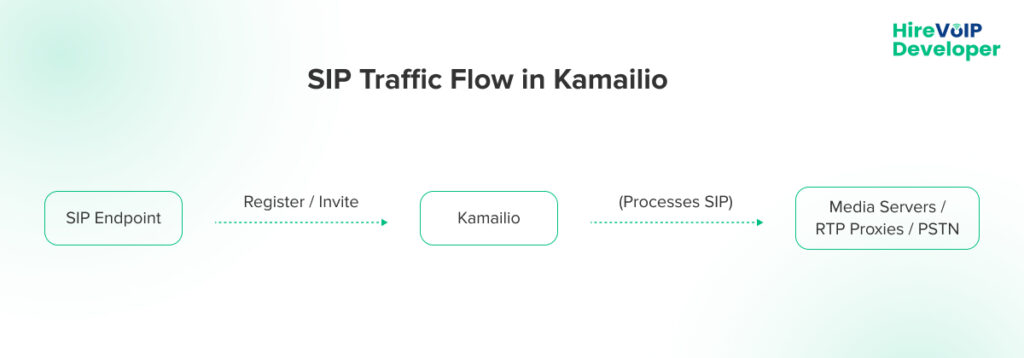
- Clients register with Kamailio using SIP REGISTER.
- When a user makes a call, Kamailio receives the INVITE and routes it accordingly.
- Kamailio doesn’t touch RTP streams; it just handles signaling.
- You can pair it with RTPProxy or MediaProxy for NAT traversal or media anchoring if needed.
Pre-Requisites to Set Up Kamailio SIP Server
Before jumping in, make sure you have:
✅ A Linux server (Ubuntu 20.04 or later is common)
✅ Basic knowledge of SIP and Linux shell
✅ Root access to install dependencies
✅ A public IP (if registering remote clients)
✅ Optional: MySQL/PostgreSQL/Redis if you want persistent registration
How to Configure Kamailio SIP Server?
To get started, use a fresh Ubuntu 20.04+ server.
1. Install Kamailio
On Ubuntu:
sudo apt update
sudo apt install kamailio kamailio-mysql-modules
2. Configure Database Support (Optional but Common)
sudo mysql -u root -p
CREATE DATABASE kamailio;
GRANT ALL PRIVILEGES ON kamailio.* TO ‘kamailio’@’localhost’ IDENTIFIED BY ‘yourpassword’;
Run Kamailio schema setup:
kamdbctl create
3. Edit the Config File
Path: /etc/kamailio/kamailio.cfg
Key things to define:
- SIP ports (default: 5060)
- Modules to load (usrloc, auth, sl, tm, rr, etc.)
- Routing logic (e.g. route[INVITE], route[REGISTER])
4. Start Kamailio
sudo systemctl start kamailio
sudo systemctl enable kamailio
How Does The Kamailio SIP Register Work?
When a SIP client sends a REGISTER request:
- Kamailio receives the request on port 5060.
- It authenticates the user (via MySQL or flat file).
- It stores contact info in the location table.
- Kamailio replies with 200 OK, and the client is now registered.
Make sure your config file loads these modules:
loadmodule “auth.so”
loadmodule “usrloc.so”
loadmodule “registrar.so”
Also, define routes for REGISTER like:
if (is_method(“REGISTER”)) {
if (!save(“location”)) {
sl_reply_error();
}
exit;
}
How Does SIP Routing with Kamailio Work?
Once your clients are registered, the next step is routing their calls. A typical SIP server configuration would route INVITE requests to the callee’s last known contact.
At its core, routing in Kamailio is handled by the request_route block in the config file.
Example:
route {
if (is_method(“INVITE”)) {
t_relay();
exit;
}
}
Through advanced SIP routing with Kamailio, you can also do:
- Load balancing across SIP trunks or Asterisk backends
- Header-based routing (e.g., based on DID or carrier prefix)
- NAT detection and RTP anchoring
- Call authentication and ACLs
- Failover logic with the dispatcher module
This routing flexibility is one of Kamailio’s strongest advantages.
Best Practices for Kamailio Deployments
Here’s what most beginners miss, and what you’ll wish you knew before going live.
- Don’t copy-paste config files without understanding them. One wrong header check can expose your SIP trunk.
- Use rtpproxy or mediaproxy if you’re dealing with NAT (especially for mobile apps).
- Enable logging via syslog to trace SIP flow in real time and debug failed calls.
- Never expose an unauthenticated SIP port on the public internet. Always use access control lists (ACLs).
- Separate config files for dev and prod environments. Modularize your logic using include files.
- Test every SIP flow with sngrep. It’s the easiest way to trace message paths and catch errors.
What Makes Kamailio Different from Other SIP Servers?
Unlike GUI-based VoIP tools (like FreePBX) or monolithic SIP stacks (like Asterisk or FreeSWITCH), Kamailio is a pure signaling engine.
That means:
- It doesn’t care about RTP
- It doesn’t come pre-configured
- It doesn’t assume your business logic
You build everything yourself, but in return, you get a system that can scale across clusters, connect to real-time databases, and handle traffic like a carrier.
This is why Kamailio SIP server development is so respected.
Kamailio SIP server is one of the most powerful tools you can have in your VoIP stack, but only if you set it up right. From simple call routing to complex carrier logic, Kamailio gives you the flexibility to control SIP signaling your way. Yes, there’s a learning curve. But if you get past it, you unlock a level of control and performance that few platforms can match.
Need help with Kamailio SIP server development or configuration? We’ve worked on real-world deployments for CPaaS, UCaaS, and global carriers. Let’s build yours!